
Online check-in for hotels: on the guest's phone or on the front-desk tablet
A shorter queue at the desk, no paper and correct details on the booking. Check-in happens either before arrival on the guest's phone, or on the front-desk tablet the moment the guest arrives.
Before arrival, on the phone
The guest receives an email with a personal portal — no app, no password. There the guest fills in personal and ID details, sees the booking and the balance, and can pay online.
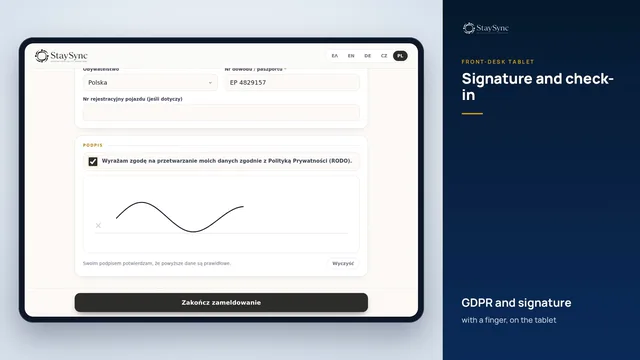 See it in action: Front-desk tablet & signatureThe booking on the tablet with one click, in the guest's language: email and mobile, details, GDPR, a finger signature and automatic check-in.
▶ Watch the video · 1:55
At the desk, on the tablet
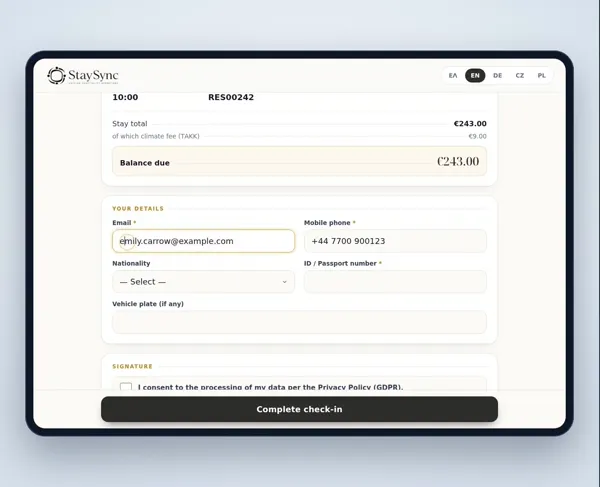
The front desk sends the booking to the tablet with one tap. The guest sees the stay details, gives email, phone, ID and nationality, accepts the GDPR terms and signs with a finger.
- If the room is ready, check-in completes automatically after the signature
- If not, the guest leaves an email and phone number and is notified as soon as the room is ready
- Multi-room bookings: an email and a signature per room
- Guests can do the same on their own phone by scanning a QR code
What the hotel gains
- A correct email and phone on every booking — for automatic messages and reviews
- A signed registration card without printing
- The guest profile updates itself for the next visit
- Amounts on the tablet only where the channel allows — a tour operator guest sees no prices
Frequently asked questions
Does it need a special tablet?
No. Any tablet with a browser. It is paired once with a 6-digit code from the front desk.
In which languages?
The guest portal and emails support Greek, English, German, Czech and Polish.
See also
Shall we look at it for your hotel?
Write to us and we will arrange a short walkthrough with your own rooms and channels.