
Front-desk LogBook: shift handover where nothing gets lost
Most things get lost at shift change: a night-time complaint, a promise to a guest, a fault that «the technician will look at». In the StaySync LogBook every shift writes what happened and the next one finds it in front of it — with who wrote it, for which guest and whether it is closed.
A handover that does not depend on memory
Every entry has a shift (morning, afternoon, night), a category, a severity and a status. New entries appear in every user's bell until they read them — a note written at 02:00 waits for the morning-shift clerk, it does not vanish at the end of the day.
- Categories: noise, room or service complaint, request, technical issue, damage, lost & found, security, medical incident, compliment
- Severity (info, warning, critical) and status (open, in progress, closed)
- A photo on the entry and a Telegram alert
- Search and filters: whatever is still open shows at a glance
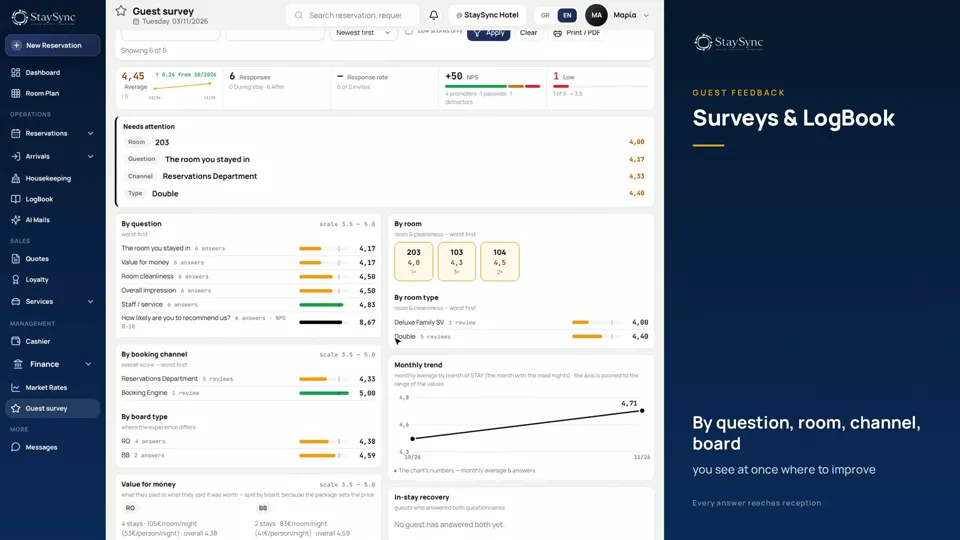 See it in action: Surveys & LogBookA survey on the guest's phone on day 2 of the stay, the rating at the front desk at once, stats per room and channel, history in the LogBook.
▶ Watch the video · 1:16
Every entry stays with the guest
An entry is tied to the booking and the guest. When a guest with a history — an old complaint, a special need, damage — books again, the front desk is alerted before arrival, and the guest profile shows the whole history.
- «Arrivals with history» alert in the bell
- Written by themselves: survey ratings, the Booking.com score, guest requests and whether they were met, upgrades, board changes
- Whatever is already in an alert is never shown twice
From a low score to a fix
When a guest scores low, management asks for «Investigation by reception» with one click. Reception sees what the guest wrote and the room's housekeeping plan from the system — who cleaned it and when — and writes down what it found. The request stays in the bell until it is answered.
Who sees what
Permissions are set per role and per user: who reads, who manages, who sees the ratings. The administrator and the manager always see everything; in a group, every hotel has its own LogBook.
Frequently asked questions
What if the next shift does not see it?
The entry stays new in each user's bell until they read it, and whatever is open or in progress shows in the filters until it is closed.
Can it be written from a phone?
Yes. The LogBook is part of the same application on desktop, tablet and phone, with a photo from the camera.
See also
Shall we look at it for your hotel?
Write to us and we will arrange a short walkthrough with your own rooms and channels.