
Tour operator contracts and allotments: from the PDF to the room plan
For a hotel that works with tour operators, the contract is the basis of the season: prices per person, periods, release, child discounts, committed rooms. StaySync keeps it alive inside the hotel's daily work, not in a file on a computer.
From the agency's PDF, in minutes
You upload the contract as the tour operator sent it. StaySync reads the seasons, release, room types, prices per person and child discounts, and prepares a proposal. You check it and save — nothing is written without you.
- The agency's room types matched to yours
- The contract price and board on the agency's bookings
- Allotment with release per period, or commitment with guaranteed rooms
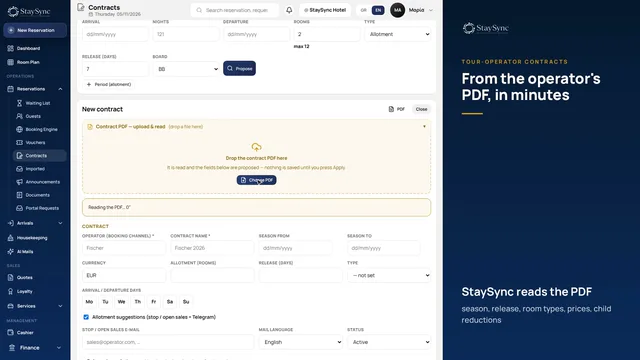 See it in action: Tour-operator contractsThe contract PDF becomes a contract in StaySync: prices per period, release, allotment rooms, placeholder bookings and stop / open sales.
▶ Watch the video · 1:41
Holds on the room plan until the booking arrives
Allotment rooms go on the room plan as the agency's holds, in a light shade of the channel colour, and are sent to the PMS so they are not sold elsewhere. When the real booking arrives — by email or rooming list — it takes the hold's place by itself.
Total availability and stop / open sales
A card shows per night how many rooms each agency has committed, how many it has filled and how many return at release. When a room type runs out, StaySync suggests stop sales and sends the email to the agency from your own mailbox, only when you press it.
- An alert when a room type is running out
- A history of every stop / open sales message sent
- A reminder before arrival for holds that were not filled
A price for a new contract from your own data
When an operator asks for rooms, StaySync works out night by night, from your own last-year figures, the floor price, the target and the opening price, with the reasoning in plain words. One click turns it into an offer document, the operator accepts it online and the contract is recorded.
Frequently asked questions
What about the holds in the channel manager?
They are sent to CloudHotel as bookings with a price and a room, so the rooms are not sold there either. When the real booking arrives, the same booking is updated.
Do the agency's bookings have to be typed in?
No. Confirmation emails and rooming-list PDFs are read automatically, along with the guests' requests (floor, view, beds).
See also
Shall we look at it for your hotel?
Write to us and we will arrange a short walkthrough with your own rooms and channels.